
Case Study: North Sea's Red-throated Diver
Source:vignettes/articles/case-study-RTD.Rmd
case-study-RTD.RmdOverview
Here we use roamR to simulate the movement and energetics for a population of common RTD (Gavia stellata) in the North Sea. For broad-scale details on the roamR package, refer to the general guide, with the general architecture repeated here:
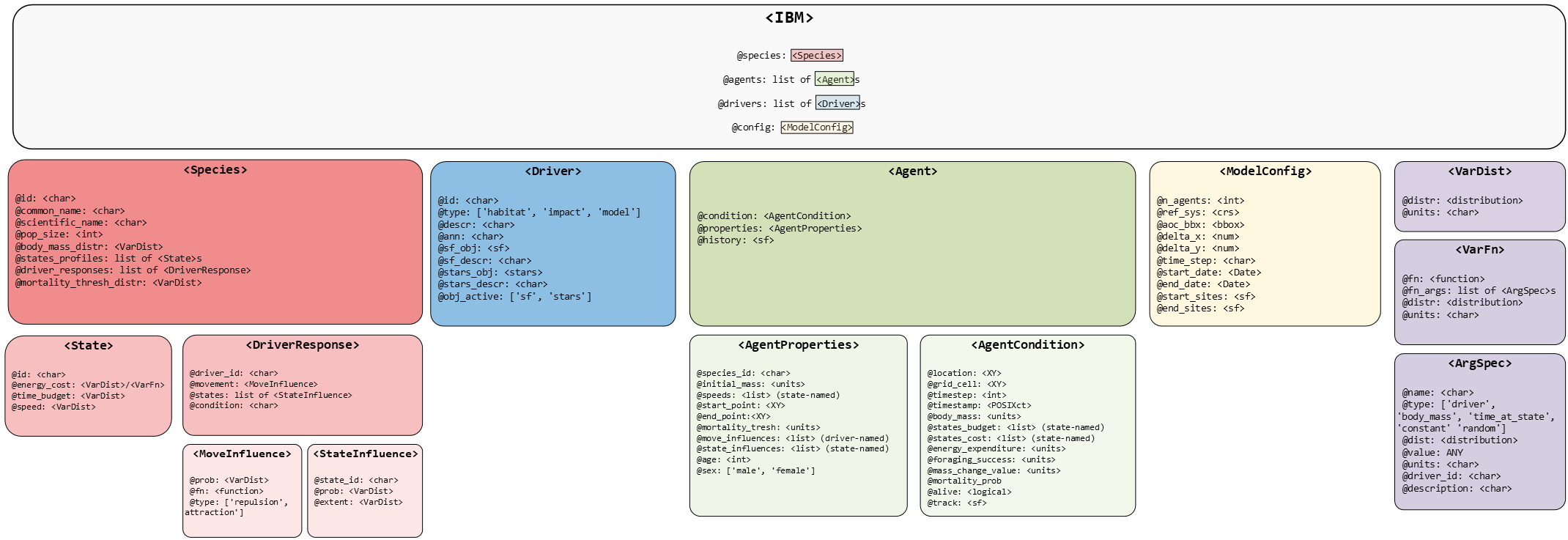
The simulations here cover the non-breeding season (some 9 months, from July to March) under two broad scenarios:
- An environment free of Off-Shore Windfarms (OWFs) - nominally the status quo
- An environment with many synthetic OWF developments

The overall intention is to quantify the effects of potential displacement from these developments, based on counter-factual comparisons of animal’s condition under these scenarios. In keeping with the architecture of the roamR package, the following main components will be populated:
-
IBM general settings
(
<ModelConfig>) sundry high-level controls for the simulation, such as the number of agents, broad spatial boundaries, spatial projections, time-steps, start & finish dates. -
Species-level information
(
<Species>) such as distributions governing initial bodymass, what behavioural states are possible, movement parameters, and how agents respond to their environment e.g. avoidance of windfarms or landmass, costs associated with activity. -
Drivers (
<Driver>) descriptions/data that define the environment that agents may interact with or respond to e.g. sea surface temperatures, locations of windfarms, coastlines, prey fields etc.
The extent to which these can be populated will obviously vary, with the red-throated chosen here as a population which is not well quantified i.e. there is little detail in the inputs required to simulated them. roamR is intentionally general and has substantial functionality that will not be used in a simulation. We will populate various elements of the simulation in turn, before turning to running the simulation and post-processing the results.
Input data
The following roamR elements will be populated, noting that some have very little detail:
- Density maps
- SST
- Activity data
- Energetics
- Bodyweight
- Bodymass conversion
which will be a) described in detail and b) specified in roamR forms in the following sections. roamR can be run with very little data (an example of a more data sparse species is given in the alternative test case of red-throated divers), with the results being correspondingly less informative and more stochastic.
IBM configuration
The broad configuration of the IBM is specified via the function
ModelConfig().In the interest of speed, the example
simulation here will not be large in terms of the number of agents to
run - we’ll opt for few agents (n_agents), whereas a
typical run would be 1000s. The non-breeding season for these animals
runs from approximately start of July for 9 months
(start_date, end_date). We’ll opt for a
uniform 1km^2 spatial resolution (x_delta,
y_delta) and have everything operate on the UTM 30N
coordinate system (ref_sys). This will be the basis of
ingesting and aligning the general spatial inputs. Note: the package
currently requires all spatial inputs (e.g. density maps) to be provided
in a common CRS projection 1. The sf package is generally
used for dealing with spatial data (and the interlinked
stars package for spatio-temporal).
# Set UTM zone 30N
utm30 <- st_crs(32630)
Agent start and end locations (start_sites,
end_sites) must be supplied assf objects
containing two required columns: id (a unique site
identifier) and prop (the proportion of agents assigned to
each site).
In this example, we use the Isle of May as the sole starting
location, specified by its geographic coordinates (longitude/latitude).
Note that end_sites is not utilised in this the simulation,
meaning the movement model assumes agents remain at their final
locations once the simulation ends. As noted earlier, the site must be
re-projected to the common UTM Zone 30N coordinate reference system.
# location of colony in long/lat degrees - start/finish locations
isle_may <- st_sf(
  id = "Isle of May",
  prop = 1,
  geom = st_sfc(st_point(c(-2.5667, 56.1833))),
  crs = 4326)

# re-project to UTM 30N
isle_may <- st_transform(isle_may, crs = utm30)
In terms of bounding the entire simulation spatially, we’ve opted for a semi-arbitrary bounding box around the Isle of May that encompasses a large swathe of the North Sea and far to the west of the UK, which covers the bulk of the RTD density maps. Note this a hard boundary in terms of simulations - data outside this will have no influence.
AoC <- st_bbox(c(xmin = 178831, ymin = 5906535, xmax = 1174762, ymax = 6783609), crs = st_crs(utm30))Passing the above configuration inputs to ModelConfig()
creates a <ModelConfig> object, which we assigned to
rtd_ibm_config:
# IBM Settings - assume fixed for these simulations

rtd_ibm_config <- ModelConfig(
  n_agents = 4,
  ref_sys = utm30,
  aoc_bbx = AoC,
  delta_x = 1000,
  delta_y = 1000,
  delta_time = "1 day",
  start_date = date("2025-07-01"),
  end_date = date("2025-07-01") + 270,
  start_sites = isle_may
)

class(rtd_ibm_config)
Driver information - specifying the environment
Drivers define the environment that agents may interact with or
respond, with each driver being specified via the Driver()
function. The scope of these will be defined by the level of knowledge
for the species in hand. Any environmental component that can/will be
functionally linked to the animals behaviour (activity states or
movement) or their energetics, must be included in the definition of the
environment via the drivers.
In this application to the common RTD, the following drivers are required - all provided as spatio-temporal datacubes (2D rasters giving values for locations over times) so the agents can query their environment at any :
- Monthly species density surfaces, for both baseline and impacted scenarios.
- Monthly energy intake maps (kJ/h), for both baseline and impacted scenarios.
- Monthly average Sea Surface Temperature (SST) maps.
roamR enforces a strict requirement that all input variables be accompanied by appropriate measurement units. This ensures that all computations performed during simulation are unit-aware, allowing for accurate operations and conversions.
We begin by uploading these datacubes, assigning measurement units where they are missing.
# driver spatial surfaces

spec_map <- readRDS("data/bioss_spec_map.rds") |>
   mutate(density =  units::set_units(density, "counts"))

spec_imp_map <- readRDS("data/bioss_spec_imp_map.rds") |>
   mutate(density =  units::set_units(density, "counts"))

intake_map <- readRDS("data/rtd_energy_intake_map.rds")

imp_intake_map <- readRDS("data/rtd_impacted_energy_intake_map.rds")

sst_map <- readRDS("data/bioss_sst_stars.rds") |>
  mutate(sst =  units::set_units(sst, "degree_Celsius")) |>
  stars::st_warp(crs = sf::st_crs(spec_map), threshold  = 20028)
Next we specify the corresponding drivers, and stored the as a list
of <Driver> objects. Collectively these define the
environment the agents will move through. This is very flexible, and
might have consisted of coastal polygons, OWF footprints, prey-fields
etc. Here the feasible locations are defined by the density surfaces (so
coast is implicit), and OWF are implicit in the “impact” density
surfaces.
# Set up IBM drivers

dens_drv <- Driver(
  id = "dens",
  type = "resource",
  descr = "species dens map",
  stars_obj = spec_map,
  obj_active = "stars"
)

dens_imp_drv <- Driver(
  id = "dens_imp",
  type = "resource",
  descr = "species redist map",
  stars_obj = spec_imp_map,
  obj_active = "stars"
)

energy_drv <- Driver(
  id = "energy",
  type = "resource",
  descr = "energy map",
  stars_obj = intake_map,
  obj_active = "stars"
)

imp_energy_drv <- Driver(
  id = "imp_energy",
  type = "resource",
  descr = "energy impact map",
  stars_obj = imp_intake_map,
  obj_active = "stars"
)


sst_drv <- Driver(
  id = "sst",
  type = "habitat",
  descr = "Sea Surface Temperature",
  stars_obj = sst_map,
  obj_active = "stars"
)


# store as list for initialisation
rtd_drivers <- list(
  dens = dens_drv,
  imp_dens = dens_imp_drv,
  energy = energy_drv,
  imp_energy = imp_energy_drv,
  sst = sst_drv
)
Species information - properties that inform individual agents
Species-level information is defined using the Species()
function, which depends on a set of input objects. For clarity and
modularity, these inputs should be prepared and specified
beforehand.
States Profile
We begin by defining the behavioural states to include in the model. Each state represents a specific activity, characterized by parameters such as energy expenditure, time allocation, and movement speed.
States are created using the State() function. roamR
supports flexible specification of state properties, allowing the
incorporation of stochastic variation at both the population and
individual (agent) level.
Here we include 4 states:
- flying
- diving
- active on water (i.e. swimming)
- inactive on water (i.e. resting)
We start with the ‘flight’ state. For the current simulation, we
assume the energetic cost of flying for each agent varies throughout the
simulation, following a Normal distribution with mean
507.6 kJ/h and standard deviation
of237.6 kJ/h. The source for these figures are Elliott et al. (2013).
Stochasticity can enter in various ways, here we specify the average speed of each agent to be fixed over the simulation (e.g. we’re implying relatively fast/slow animals), with agents speeds drawn from a uniform distribution, as specified below.
# user-defined function returning the energy cost of flying
# ((((3.201∗𝑏𝑚*exp(0.71924))+(4.05∗𝑏𝑚*exp(0.791000)∗18.8))/2)*12.5)/bm


flight_cost_fn <- function(mean, sd){
  e <- rnorm(1, mean, sd)
  (max(e, 1)) |>
    units::set_units("kJ/h")
}

flight <- State(
  id = "flight",
  energy_cost = VarFn(
    flight_cost_fn,
    args_spec = list(mean = 507.6, sd = 237.6),
    units = "kJ/hour"
    ),
  time_budget = VarDist(0.056, "hours/day"),
  speed = VarDist(dist_uniform(10, 20), "m/s")
)
The state representing the ‘diving’ activity (Elliott et al. 2013) as energy output
contingent on the amount of diving. Here we are performing day-level
calculations, meaning we are far from simulating at the dive level, and
can use a mean dive-length without loss of generality. This is
t_dive and populated later from tag information.
Where is the dive length of dive in minutes.
# define costing function
# ((((3.201∗𝑏𝑚*exp(0.71924))+(4.05∗𝑏𝑚*exp(0.791000)∗18.8))/2)*5.1)/bm/60 + IF sea temperature < 47.2 * bm*exp(-0.18) THEN add: (3.47*bm*exp(-0.573)*(difference between Sea Temperature and 47.2 * bm*exp(-0.18)))/1000

dive_cost_fn <- function(t_dive, alpha_mean, alpha_sd){
  alpha <- rnorm(1, alpha_mean, alpha_sd)
  (max(alpha*sum(1-exp(-t_dive/1.23))/sum(t_dive)*60, 1)) |>
    units::set_units("kJ/h")
}


# Construct <State> object
dive <- State(
  id = "diving",
  energy_cost = VarFn(
    dive_cost_fn,
    args_spec = list(t_dive = 1.05, alpha_mean = 3.71, alpha_sd = 1.3),
    units = "kJ/hour"
    ),
  time_budget = VarDist(3.11, "hours/day"),
  speed = VarDist(dist_uniform(0, 1), "m/s")
)
State representing ‘active on water’ (Buckingham et al. 2023) is a linear function in SST:
where has a mean of 113 and SD of 22. is a constant of 2.75.
# ((((3.201∗𝑏𝑚*exp(0.71924))+(4.05∗𝑏𝑚*exp(0.791000)∗18.8))/2)*3.5)/bm + IF sea temperature < 47.2 * bm*exp(-0.18) THEN add: (1.532*bm*exp(-0.546)*(difference between Sea Temperature and 47.2 * bm*exp(-0.18)))/1000

active_water_cost_fn <- function(sst, int_mean, int_sd){
  int <- rnorm(1, int_mean, int_sd)
  (max(int-(2.75*sst), 1)) |>
    units::set_units("kJ/h")
}


# Construct <State> object
active <- State(
  id = "active_on_water",
  energy_cost = VarFn(
    active_water_cost_fn,
    args_spec = list(sst = "driver", int_mean = 113, int_sd = 22),
    units = "kJ/hour"
  ),
  time_budget = VarDist(10.5, "hours/day"),
  speed = VarDist(dist_uniform(0, 1), "m/s")
)
State for ‘inactive on water’ (Buckingham et al. 2023), follows the same linear function in SST, but where has a mean of 72.2 and SD of 22. is similarly constant at 2.75.
# ((((3.201∗𝑏𝑚*exp(0.71924))+(4.05∗𝑏𝑚*exp(0.791000)∗18.8))/2)*1.9)/bm + IF sea temperature < 47.2 * bm*exp(-0.18) THEN add: (1.532*bm*exp(-0.546)*(difference between Sea Temperature and 47.2 * bm*exp(-0.18)))/1000

inactive_water_cost_fn <- function(sst, int_mean, int_sd){
  int <- rnorm(1, int_mean, int_sd)
  (max(int-(2.75*sst), 1)) |>
    units::set_units("kJ/h")
}


inactive <- State(
  id = "inactive_on_water",
  energy_cost = VarFn(
    active_water_cost_fn,
    args_spec = list(sst = "driver", int_mean = 72.2, int_sd = 22),
    units = "kJ/hour"
  ),
  time_budget = VarDist(10.3, "hours/day"),
  speed = VarDist(dist_uniform(0, 1), "m/s")
)
These are combined to give a list covering all states:
rtd_states:
rtd_states <- list(
  flight = flight,
  dive = dive,
  active = active,
  inactive = inactive
)
Driver Responses
In this section, we define species-level, agent-specific responses to
the environmental drivers introduced and defined earlier. For the RTD
model, we assign the density drivers - identified as "dens"
(baseline) and "dens_imp" (impacted) - as the primary
determinants of agent movement (density maps as per Buckingham et al. (2022)). For each scenario, we
also specify the probability that an agent is influenced by the
respective driver. In the baseline case, all agents “respond” to the
density map for their movement. For driver "dens_imp", this
probability reflects how likely an agent is to respond to a OWF
installation (Peschko et al. 2024) - hence
their influence map differs.
resp_dens <- DriverResponse(
  driver_id = "dens",
  movement = MoveInfluence(
    prob = VarDist(distributional::dist_degenerate(1)),
    type = "attraction",
    mode = "cell-value",
    sim_stage = "bsln"
  )
)

resp_imp_dens <- DriverResponse(
  driver_id = "dens_imp",
  movement = MoveInfluence(
    prob = VarDist(distributional::dist_normal(0.67, sd = 0.061)),
    type = "attraction",
    mode = "cell-value",
    sim_stage = "imp"
  )
)
Create the <Species> object
In addition to the parameters defined above, we set the remaining species-level properties, including the body mass distribution (used to initialise each agent’s body mass) and the energy-to-mass conversion rate (Dunn et al. 2022), which is assumed constant across agents and simulated time steps. The distribution of bodymass at start of breeding season was drawn/inferred from Duckworth (2023).
rtd <- Species(
  id = "rtd",
  common_name = "red throated diver",
  scientific_name = "Gavia stellata",
  body_mass_distr = VarDist(dist_normal(mean = 2000, sd = 160), "g"),
  energy_to_mass_distr = VarDist(0.072, "g/kJ"),
  states_profile = rtd_states,
  driver_responses = list(resp_dens, resp_imp_dens)
)
Setting up and running the IBM
Now the key components of the IBM have been specified, roamR can be used for the initialisation and running of the simulations.
Initialisation
The intialisation stage performs two main tasks prior to running:
- The checking of inputs for conformity, some adjustments (e.g. clipping to the AoC) and derivation of of vector fields where needed.
- The generation the
n_agentsas indicated in the model config object.
set.seed(1009)

rtd_ibm <- xfun::cache_rds({
  rmr_initiate(
  model_config = rtd_ibm_config,
  species = rtd,
  drivers = rtd_drivers
)

})
Running the simulation
The running of the simulation involves moving each of the initialised
agents through the defined environment, with monitoring of their
condition through time and determining their responses to these.
Parallelisation is dealt with (and assumed to be generally used) such
that individual agents are piped out to independent threads of
calculation. The furrr package handles the parallelisation,
and usually the number of workers is slightly less than those available
to allow scope for other tasks without saturating the computer.
Much of the parameterisiation and data from previous sections are
encapsulated within the ibm object (rtd_ibm)
passed to the simulation. Several additional parameters as per
documentation can be entered here as needed. Here we specify:
- What state(s) are feeding states or resting states - the state-balancing calculations (refer main documentation) will increase/decrease these as required
-
feed_avg_net_energythe average net energy per unit feeding - here a tuning parameter, caclcuable directly as the energy required to balance the energetics equations for an average agent. -
target_energythe objective of the state rebalancing in terms of daily energy. Here a modest increase is attempted, based on figures indicating a modest gain over the non-breeding season. -
smooth_body_massa use-defined function to convert energy time-series to mass. Here mass deposition occurs as a function of the preceding 7 days energy intake.
plan(multisession, workers = 2)

rtd_results <- xfun::cache_rds({
  run_disnbs(
  ibm = rtd_ibm,
  run_scen = "baseline-and-impact",
  dens_id = "dens",
  intake_id = "energy",
  imp_dens_id = "dens_imp",
  imp_intake_id = "imp_energy",
  feed_state_id = "diving",
  roost_state_id = "inactive_on_water",
  feed_avg_net_energy = units::set_units(422, "kJ/h"),
  target_energy = units::set_units(1, "kJ"),
  smooth_body_mass = bm_smooth_opts(time_bw = "7 days"),
  waypnts_res = 1000,
  seed = 1990
)

})

plan(sequential)
Digesting the results
roamR records an extensive amount of information from its running and monitoring of the agents. The primary output is a list, with one element for each agent. The stored agents consist of three main components (each their own class, as per the package schema):
-
properties- were drawn/set at the intialisation of the simulation from the species definition, remain constant throughout -
condition- the specific condition of the agent at any point in the simulation. This will be the final condition at when the simulation completes. -
history- a detailed record of elements of the agent’s condition throughout the simulation. Spatiotemporally stamped, and includes post-processed energy-to-mass conversions.
These form the basis of any downstream calculations based on the simulation outputs. When there are impact scenarios in play, there will be more than one such list, with agents paired over the impact scenarios e.g. baseline versus impact.
We can examine the agent’s simulation histories directly - here we have two scenarios, each containing a number of agents:
# two scenarios
  names(rtd_results)

# several agents within each
  length(rtd_results$agents_bsln)

# one agents history
rtd_results$agents_bsln[[1]]@history
Comparing scenarios
Here we extract the history from agents under the two scenarios for comparison. All agents over both scenarios are combined into one dataset.
# gather history from all agents, under the 2 scenarios, into one data frame
rtd_history <- map(rtd_results, function(scn){
  map(scn, ~.x@history) |>
  setNames(1:rtd_ibm_config@n_agents) |>
  list_rbind(names_to = "agent")
}) |>
  setNames(c("status-quo", "impact")) |>
  list_rbind(names_to = "scenario") |>
  mutate(
    Date = as.Date(timestamp),
    agent = as.numeric(agent),
    month = lubridate::month(timestamp)
  )

# add information on whether agents are susceptible to be influenced by the impact
infl <- tibble(
  agent = 1:rtd_ibm_config@n_agents,
  suscep = purrr::map_lgl(rtd_ibm@agents, ~.x@properties@move_influences$dens_imp$infl) == TRUE
)

rtd_history <- left_join(rtd_history, infl, by = "agent") |> st_as_sf()

rtd_history
Bodymass traces
We can examine a small number of agents graphically - here their bodymass histories as implied by the simulated energetics. Note roamR at its heart simulates energetics, conversion functions from energy to mass are specified by the user.
p_bdm <- rtd_history |>
  ggplot() +
  geom_line(aes(x = Date, y = body_mass_smooth, col = scenario), linewidth = 1) +
  scale_color_brewer(palette = "Set1") +
  theme(legend.position = "bottom") +
  facet_wrap(~agent, ncol = 2, scales = "free")

p_bdm

ggsave("images/bodymass.png", p_bdm, width = 12, height = 12)
Agent tracks
Similarly movement tracks for select agents over time can be visualised, under the two impact scenarios. Here we separate by a property of the agent - those that were assigned susceptibility to OWF in the agent initialisation - recalling this was a stochastic specification at the species level.
p_tracks <- rtd_history |>
  drop_na(timestamp) |>
  filter(suscep == FALSE) |>
  filter(agent == last(agent)) |>
  ggplot() +
  stars::geom_stars(data = spec_imp_map) +
  geom_sf(aes(col = scenario)) +
  scale_color_brewer(palette = "Set1") +
  scale_fill_distiller(palette = "Greys", direction = 1) +
  facet_wrap(~month, ncol = 3) +
  labs(title = "Monthly movement tracks for a non-sensitive agent", subtitle = "Status-quo Vs Impacted scenarios")

p_tracks

ggsave("images/tracks_non_susceptile_agent.png", p_tracks, width = 15, height = 15)
p_tracks <- rtd_history |>
  drop_na(timestamp) |>
  filter(suscep == TRUE) |>
  filter(agent == last(agent)) |>
  ggplot() +
  stars::geom_stars(data = spec_imp_map) +
  geom_sf(aes(col = scenario)) +
  scale_color_brewer(palette = "Set1") +
  scale_fill_distiller(palette = "Greys", direction = 1) +
  facet_wrap(~month, ncol = 3) +
  labs(title = "Monthly movement tracks for a sensitive agent", subtitle = "Status-quo Vs Impacted scenarios")

p_tracks

ggsave("images/tracks_susceptile_agent.png", p_tracks, width = 15, height = 15)
Use of counterfactals
Quantification of the impact of the perturbation can be done on any of the defined agent condition (and/or history), but for consenting the utility is through EIAs that likely use:
- Cumulative net energy
- Season-end body mass or mass change
- Distributions of activity/behavioural states
- Minimum body-mass over the season
- (relatedly) Mortality
These are not single values, but distributions representing the variability in the simulated populations. While being directly informative at a population level (e.g. the mean %-age of the population lost), the distributions are tangible for down-stream calculations. The most obvious application being in Population Viability Analyses (PVAs) that are frequently required in EIAs for consenting. There the counterfactuals may use:
- Increases in mortality/proportional reductions in population size
- Relationships between body mass and reproductive success, to alter PVA demographic parameters
For example, Natural England provide an R PVA toolset here [nepva]https://github.com/naturalengland/Seabird_PVA_Tool, frequently used in consenting, where the distributions of productivity can be specified under differing scenarios. The PVAs provide monte-carlo simulations of projected population sizes, which are matched (impact-to-baseline) to give population-level counterfactuals of impacts. The DisNBS simulations can be used to estimate these productivities.